See Exactly What's Safe to Spend Until Your Next Paycheck.
One number instead of 12 tabs. A Google Sheets + Excel planner that splits every paycheck into 3 lanes and shows you one safe-to-spend number, based on the numbers you enter.
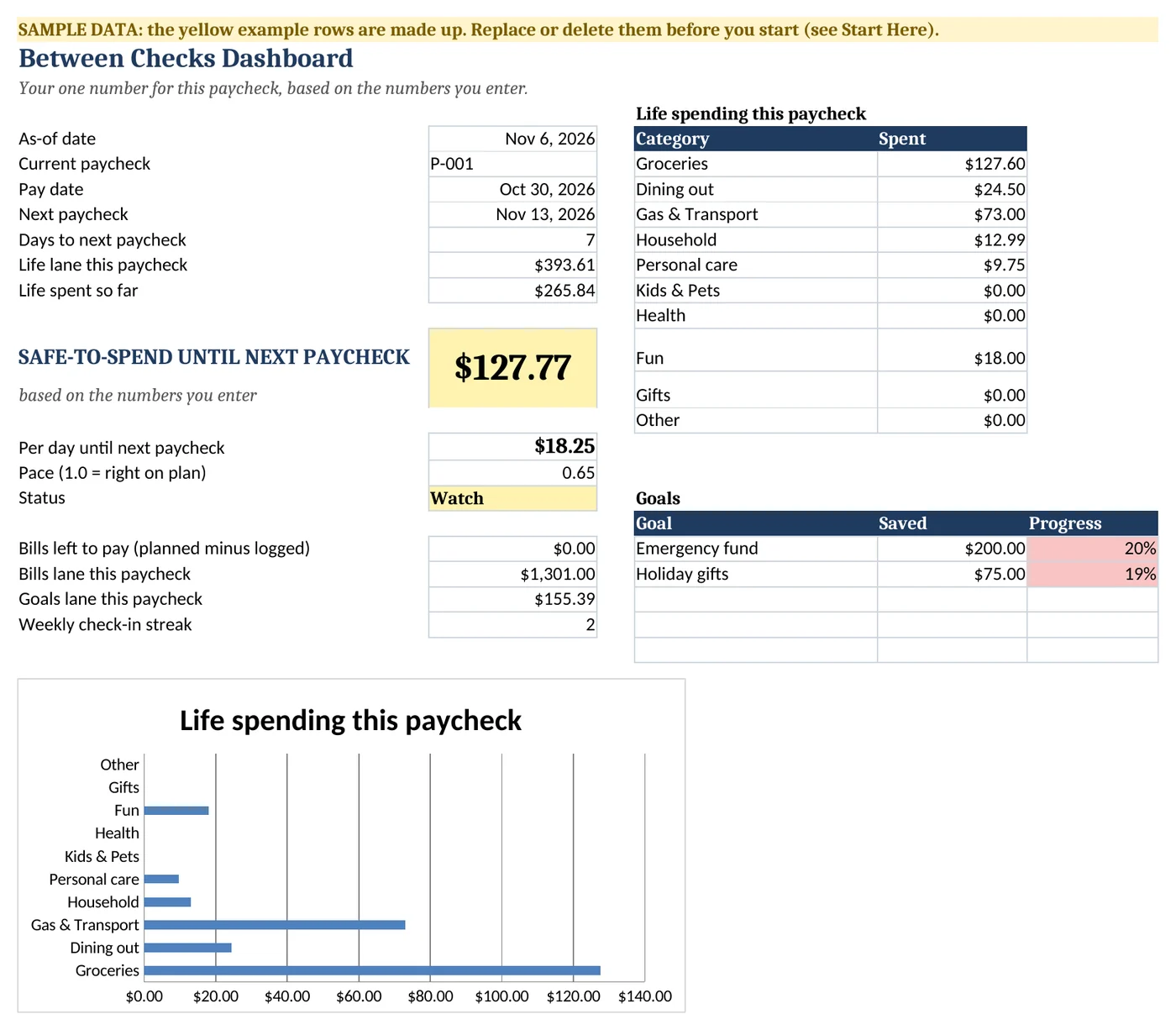
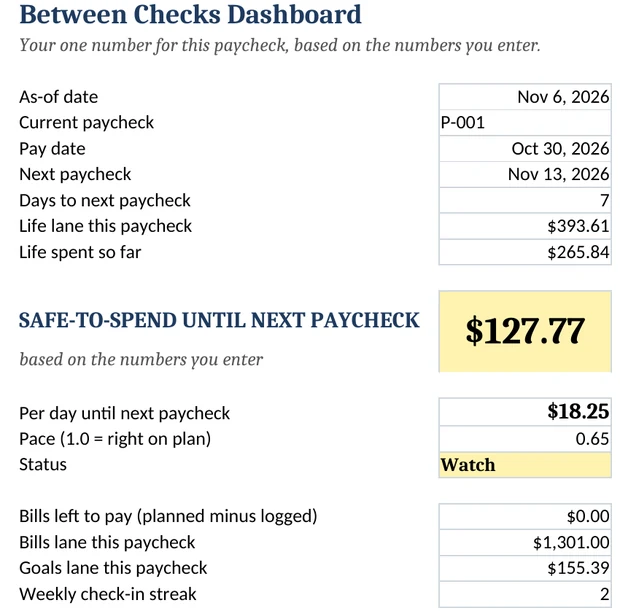
Images show sample data.
- $27 one-time, no subscription
- Google Sheets + Excel
- No bank connection
- 30-day money-back guarantee
A budget can be full of numbers and still not answer the question that matters on a Tuesday.
"Can I say yes to this?"
A monthly budget tells you what you planned on the 1st. It doesn't tell you what's still free on the 19th, with rent on one paycheck, the phone bill on the next, and groceries somewhere in between.
So the usual move is to open the spreadsheet, scroll through the tabs, do some math in your head… and close it. A few weeks later the spreadsheet stops getting opened at all.
That isn't a discipline problem. A lot of budgets are built to record money, not to answer a question.
This one is built to answer one:
How it answers that question, in 3 steps
Enter your paycheck.
Date, amount, how often you're paid.
The planner sorts it into 3 lanes.
Bills due before your next paycheck, your Goals, and everything else.
You get one number.
What's left in your Life lane, minus what you've logged, shown in green, yellow or red, and as a per-day amount until your next paycheck.
Based on the numbers you enter. The planner doesn't connect to your bank, so it's as current as your last log.
The method: 3 Lanes + 1 Number
Every paycheck gets split into three lanes, automatically:
Bills.
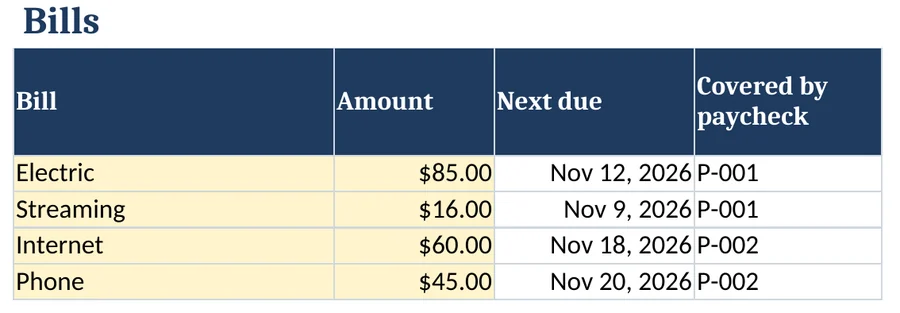
Recurring bills due before your next paycheck. Each bill is assigned to the paycheck that comes before its due date, so each bill is counted once, on the paycheck that covers it.
Goals.
Sinking funds and anything you're setting aside for. You set the target and the date, and the planner shows how much to set aside from each paycheck.
Life.
Everything else: groceries, gas, coffee, plans with friends.
And then, one number:
Life lane − what you've logged = your number. Divided by the days until your next paycheck = your per-day number.
Green (On track) means there's room. Yellow (Watch) means slow down. Red (Tight or Over plan) means the Life lane is almost or fully used up for this paycheck. That's it. No 12-tab dashboard to decode.

Budget by paycheck, not by month
Money doesn't arrive "monthly" for a lot of people. It arrives every Friday, every other Friday, on the 1st and the 15th.
So the planner's calendar runs by paycheck. Every bill shows up under the paycheck that's going to cover it. Weekly, biweekly, twice a month or monthly: you pick your schedule in the Start Here tab, and the plan lines up with it.
The part most budgets skip: keeping it going
Setting up a budget is the easy part. Opening it again next week is the hard part.
So the planner comes with a short weekly check-in built right in: a 5-step script on its own tab.
- Log this week's spending.
- Check which bills are due before your next paycheck.
- Adjust one goal.
- Look at your number.
- Write one note for next week.
Each check-in you log adds to your streak, so you can see the habit build week after week. Pick a time (Sunday morning is a good start) and put it on your calendar.

Quick logging. Plan what's coming.
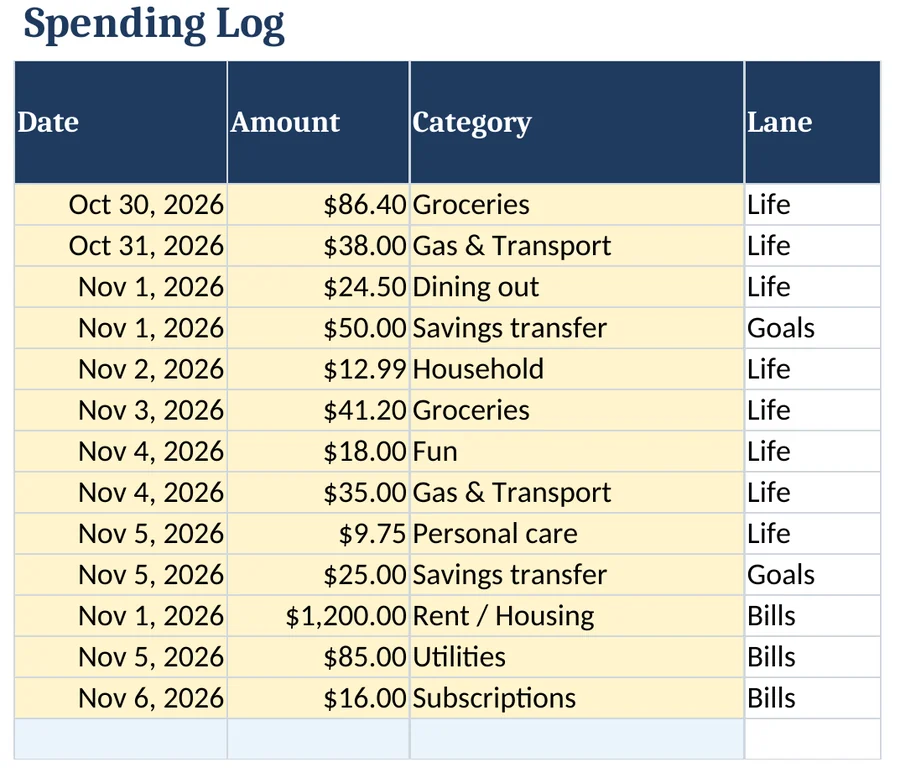
Spending Log
Quick entry with drop-down categories. Simple entries also work from your phone in the Google Sheets app.
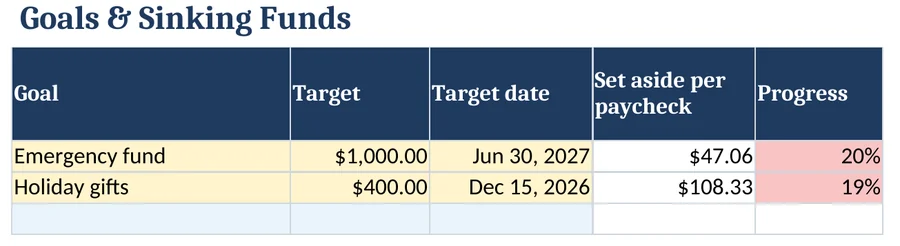
Goals & Sinking Funds
Targets, dates and how much to set aside from each paycheck.
Works in Google Sheets and Excel
Google Sheets
One click makes your own copy in your Google Drive. Any free Google account works.
Excel
Download the .xlsx. Same tabs, same formulas. Works in Excel 2016 or later, including Microsoft 365.
On your phone
View your number and log quick entries with the free Google Sheets app. Setup and everything else is done on a computer.
No macros, no scripts, no add-ons
Nothing to install or authorize.
Here's everything you get
Between Checks Planner · Google Sheets version + Excel version
- Start Here. Pick your pay schedule, the date of your first paycheck and your typical take-home amount, with step-by-step setup instructions.
- Paychecks. Every paycheck in one list: date, source, expected and actual amount.
- Bills. Your recurring bills with due dates and autopay notes, each one matched to the paycheck that covers it.
- Plan. Each paycheck split into Bills, Goals and Life, with suggested splits you can edit.
- Spending Log. Quick entry with drop-down categories. Simple entries also work from your phone in the Google Sheets app.
- Between Checks Dashboard. Your number, your per-day number, bills still to pay this paycheck, goal progress and a chart of this paycheck's Life spending by category.
- Goals & Sinking Funds. Targets, dates and how much to set aside from each paycheck.
- Weekly Check-in. The 5-step script, a log of your check-ins and your streak.
- Extra planning tabs for looking further ahead, included in the same file.
- Sample data + a clear-it guide, so you can see how everything works before you enter your own numbers.
- Free updates to version 1.
This is for you if…
- You get paid weekly, biweekly, twice a month or monthly, and monthly budgets never quite lined up with that
- You've tried a budgeting spreadsheet or app before and stopped using it
- You want one number you can check from your phone, not a dashboard to interpret
This is NOT for you if…
- You want something that syncs with your bank automatically. This planner doesn't connect to any bank account.
- You're looking for financial advice or someone to tell you what to do with your money. This is a tool for organizing the numbers you already have.
Why we built it this way
We looked at a lot of budget spreadsheets before building this one. Many were beautiful, and many had a tab for everything. But most of the ones we looked at handed over a dashboard to fill in and left the interpretation to the user.
We wanted the opposite: fewer things to look at, one clear answer, and a short weekly routine to keep that answer current.
The price: $27, one time
No subscription and no monthly fee. You get the Google Sheets version, the Excel version and every version 1 update for a single $27 payment.
Your next paycheck is coming either way. The only question is whether you'll know what's safe to spend from it.
30-Day Money-Back Guarantee
30-Day Money-Back Guarantee. If you're not happy with your purchase for any reason, request a refund within 30 days by replying to your purchase email or directly at refund.hotmart.com with your order number. Full terms: https://betweenchecks.com/refund
FAQ
Is this an app?
No. It's a spreadsheet for Google Sheets and Excel. You make your own copy and it's yours. (We're working on an app. Buyers can join the free waitlist after purchase.)
Does it connect to my bank?
No. You enter your paychecks, bills and spending, and the planner does the math. Nothing is linked to your bank, and we never see your numbers.
How "safe" is the safe-to-spend number?
It's math on the numbers you enter: your paycheck, your bills due before the next one, your goals and what you've logged. It's only as accurate as those numbers, so the weekly check-in is there to keep it current. It isn't financial advice and it can't account for anything you haven't entered.
I get paid weekly / every two weeks / twice a month / monthly. Does it work?
Yes. Pick your schedule in the Start Here tab and the plan follows your real paychecks.
What if my pay changes from check to check?
Enter the expected amount, then the actual amount when it arrives. The lanes and your number update from the actual amount.
Can I use it on my phone?
Partly. With the free Google Sheets app you can view your number and log quick entries. Setup, editing your plan and the check-in are done on a computer, in Google Sheets or Excel.
Which version of Excel do I need?
Excel 2016 or later, including Microsoft 365. In Google Sheets, any free Google account works.
How do I get it?
Right after checkout you'll get access by email, with a "Make a copy" link for Google Sheets and the Excel download.
What if it's not for me?
30-Day Money-Back Guarantee. If you're not happy with your purchase for any reason, request a refund within 30 days by replying to your purchase email or directly at refund.hotmart.com with your order number. Full terms: https://betweenchecks.com/refund
Who made this?
Between Checks Planner is made by BRFY Tecnologias. Questions before or after you buy: [email protected].
One number. One short check-in a week.
P.S. The whole planner exists to answer one question: how much can I safely spend until my next paycheck? It's $27 once, it works in Google Sheets and Excel, and it's covered by our 30-Day Money-Back Guarantee. If you're not happy with your purchase for any reason, request a refund within 30 days by replying to your purchase email or directly at refund.hotmart.com with your order number. Full terms: https://betweenchecks.com/refund